


Key points in this article:
- Add-to-cart conversion rate tracks the share of people who put at least one product into their shopping cart when visiting your website.
- A good add-to-cart conversion rate typically ranges between 10% and 15%, though this varies by industry and product type.
- Reducing friction on product pages improves the user experience and supports decision‑making.
- Making the add‑to‑cart button more prominent increases visibility and click‑throughs.
- Strengthening social proof (like reviews and testimonials) can boost trust and confidence, increasing the likelihood shoppers adding products to their carts.
In the world of ecommerce marketing, your add-to-cart conversion rate is a critical indicator of how effectively your site turns interest into intent.
Every visit represents a valuable opportunity, but not all sessions lead to action.
By optimizing your content, user experience, and messaging, you can influence how shoppers interact with your basket and move closer to purchase.
There are many practical ways to reduce friction and guide users toward adding products to their cart.
In this article, we’ll explain what add-to-cart conversion rate is and explore the top strategies to help you capture more value from your traffic and convert more browsing sessions into buying behavior.
What is add-to-cart conversion rate in ecommerce?
Add-to-cart conversion rate measures the percentage of website visitors who add at least one product to their shopping cart.
It indicates how effectively a site persuades users to move from browsing to purchase intent.
The metric is calculated by dividing the number of sessions with an add-to-cart action by total sessions, then multiplying by 100.
For example, say that your ecommerce site had 50 site visitors yesterday, and 5 of these visits resulted in people adding products to their shopping carts.
You’d calculate your add-to-cart conversion rate as follows:
5 / 50 x 100 = 10%
A higher rate suggests strong product appeal, pricing, and user experience, while a low rate may signal friction or lack of interest.
What is a good add-to-cart conversion rate?
A good add-to-cart conversion rate varies by industry, device, and traffic source.
According to DashThis, most add-to-cart rates are between 9% and 18% for ecommerce websites worldwide, with the average rate in the United States being about 10%.
High-performing stores may reach 10–15% or more on average, especially in niches with strong purchase intent. Generally, anything above your industry average is considered “good.”
Factors like clear product pages, competitive pricing, fast load times, and trust signals can increase this rate.
A high add-to-cart rate doesn’t guarantee sales. Cart abandonment still matters. It’s best evaluated alongside metrics like conversion rate and checkout completion to understand overall performance.
How to improve your add-to-cart conversion rate
Improving your add-to-cart rate is a key component of successful ecommerce conversion rate optimization (CRO).
By understanding user behavior and reducing friction in the buying journey, businesses can turn more browsers into buyers.
The following strategies highlight practical, data-driven ways to optimize your store and encourage more shoppers to take that crucial next step.
1. Optimize product page design
An optimized product page design is essential for improving your add-to-cart conversion rate because it directly influences how quickly and confidently potential customers can make purchase decisions.
Simple and intuitive site design is what ecommerce customers want when looking to buy goods or services online.
A cluttered or confusing layout creates friction, while a clean, intuitive design guides users toward taking action. Clear visual hierarchy helps ecommerce shoppers focus on key elements like product images, pricing, and benefits without distraction.
To optimize your product pages effectively, consider implementing the following:
- a simple, scannable layout with plenty of whitespace and logical sections;
- strong, benefit-driven headlines that immediately communicate value; and
- a prominent “Add to Cart” button, using contrasting colors to make it stand out, above the fold (the bottom of the screen) so users don’t need to scroll to act
Altogether, these elements reduce hesitation, build confidence, and make it easier for users to add products to their basket.
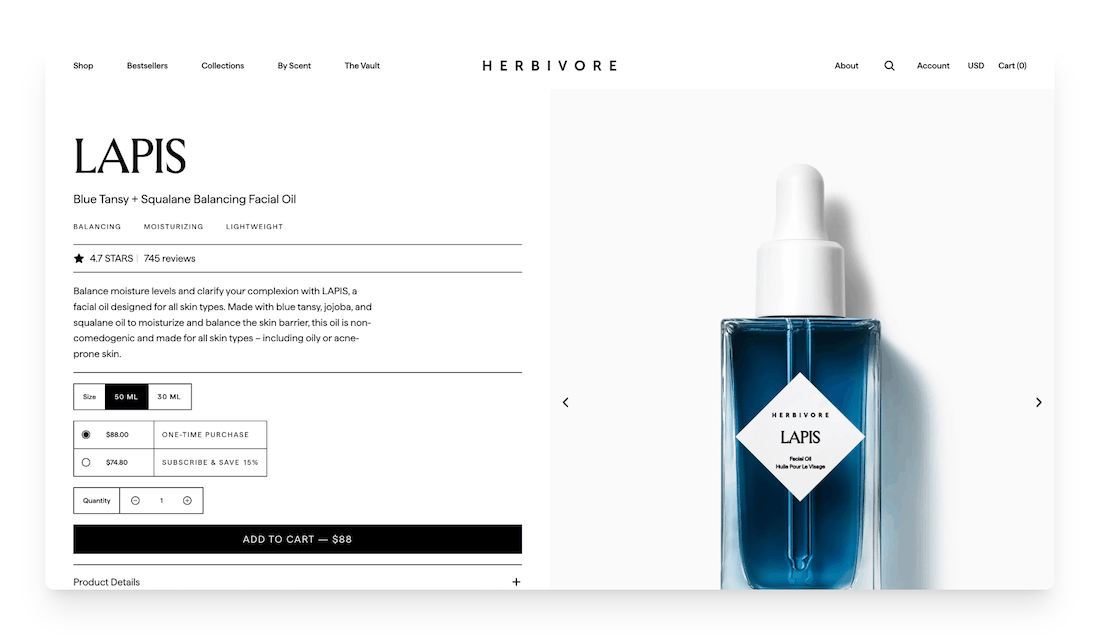
Well-crafted product page design on the Herbivore Botanicals website
2. Work on your product images and videos
Since customers can’t physically touch or try items when shopping on an ecommerce website, visuals must communicate quality, size, texture, and functionality.
Top-notch product images and video content can help boost your add-to-cart conversion rate because they replace the in-store experience, assisting people shopping on your site with understanding the product and feeling confident during the process of buying online.
Poor or limited visuals create uncertainty in the customer, while rich, detailed media builds trust and reduces hesitation when it comes to adding an item to their basket.
When considering what images to include on your ecommerce site, aim to use high-resolution images that show the product from multiple angles and in real-life contexts.
With zoom functionality, users are free to inspect details closely, and 360° views provide for a more interactive ecommerce customer experience.
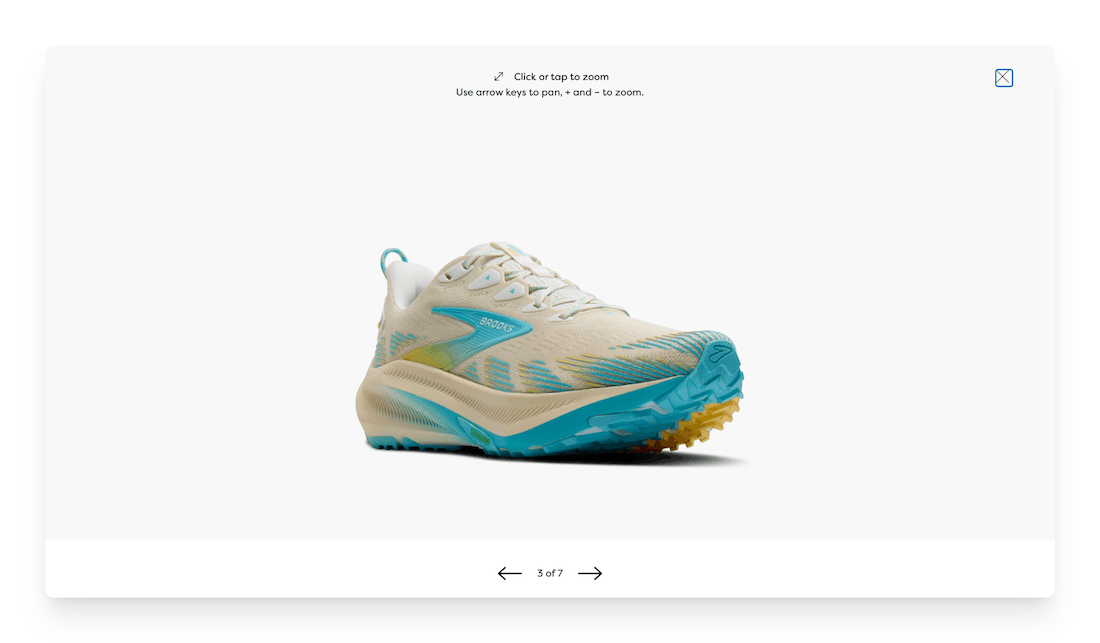
Option to zoom in on product photo on Brooks website
Short demo videos can highlight key features, usage, and benefits in ways that static images cannot.
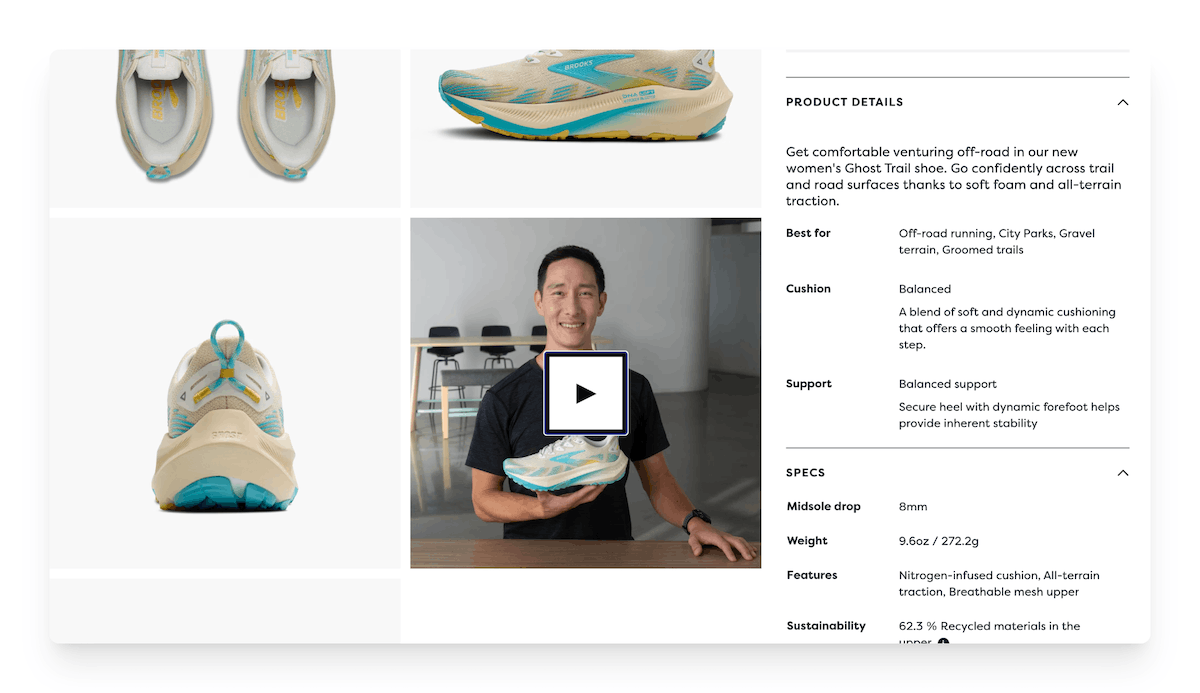
Product video for Brooks Ghost Trail shoes
One last tip: including lifestyle visuals are also great for getting customers to better imagine owning the product themselves!
3. Write persuasive product descriptions
Shoppers don’t just buy products… They buy solutions, outcomes, and feelings.
A strong description helps them clearly see why the product matters to them, reducing hesitation and uncertainty and bridging the gap between interest and action, making it more likely that they’ll add items to their carts and bolstering your ecommerce CRO.
As you create your product descriptions, focus on benefits over features: instead of listing specs, explain how those features enhance the customer’s life.
For example, “long battery life” becomes “stay connected all day without worrying about charging.”
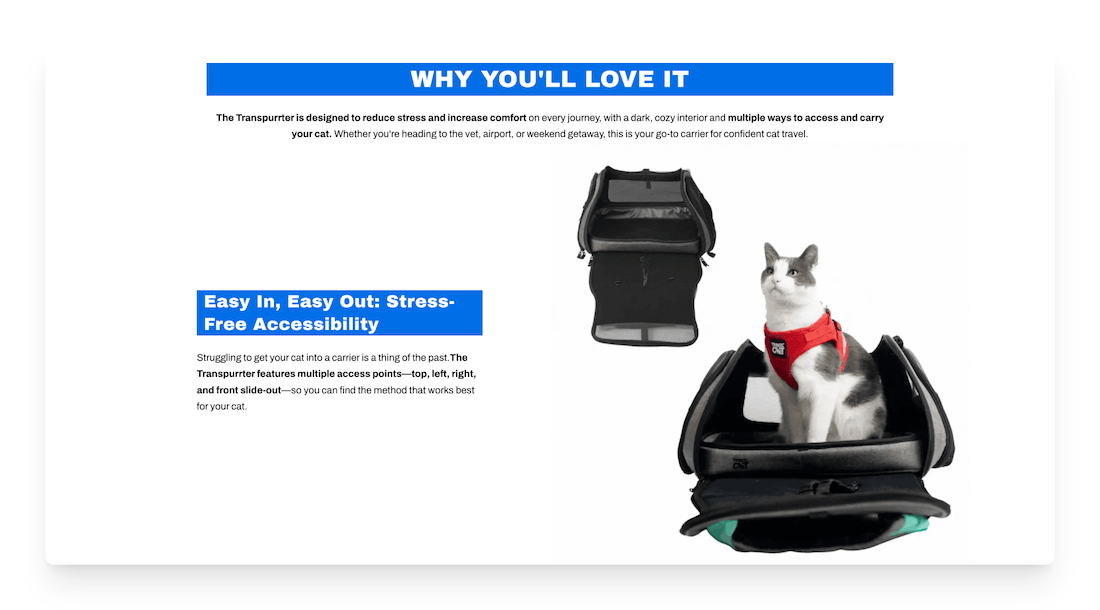
Benefits of the Transpurrter cat carrier shared by Travel Cat
Next, address pain points by identifying common problems your audience faces and showing how your product solves them.
Anticipate and overcome objections (e.g., price, quality, or usability) by including reassurances like guarantees, testimonials, or clear explanations.
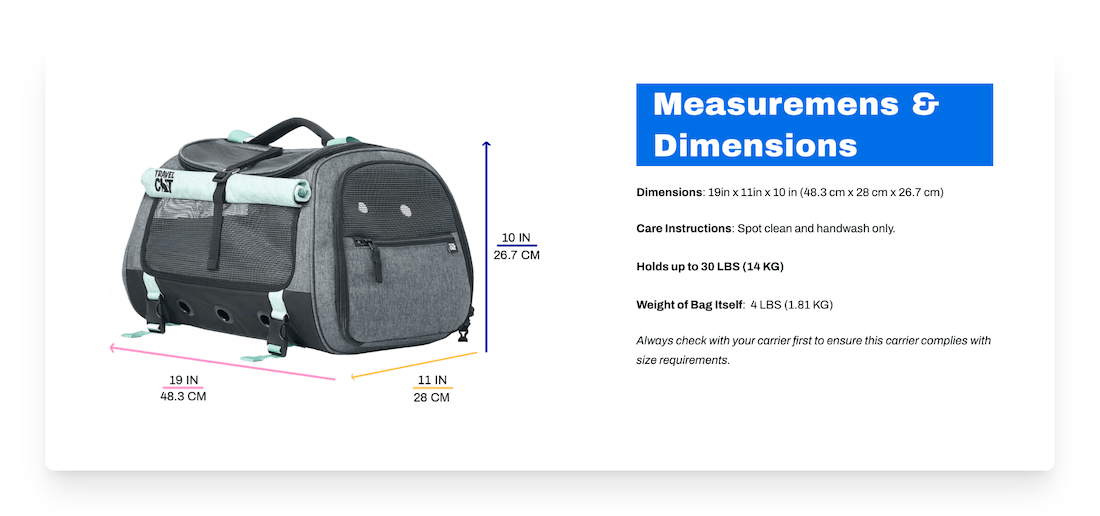
Travel Cat carrier measurements and dimensions to increase customer confidence
Remember to use clear, engaging language and a conversational tone. When customers feel understood and confident, they’re far more likely to click “Add to Cart.”
4. Display pricing clearly
Price plays a major role for many digital commerce consumers when it comes to deciding what products to buy. You’ll therefore want to ensure that this information is as clear as possible on your website!
Clear pricing builds trust and removes friction at a critical decision point. When shoppers can quickly understand the total cost, they feel more confident moving forward; unclear or surprising fees often lead to hesitation or cart abandonment.
Avoid hidden costs by displaying all key charges upfront, including taxes, shipping, or service fees where possible. Transparency reduces negative surprises at checkout.
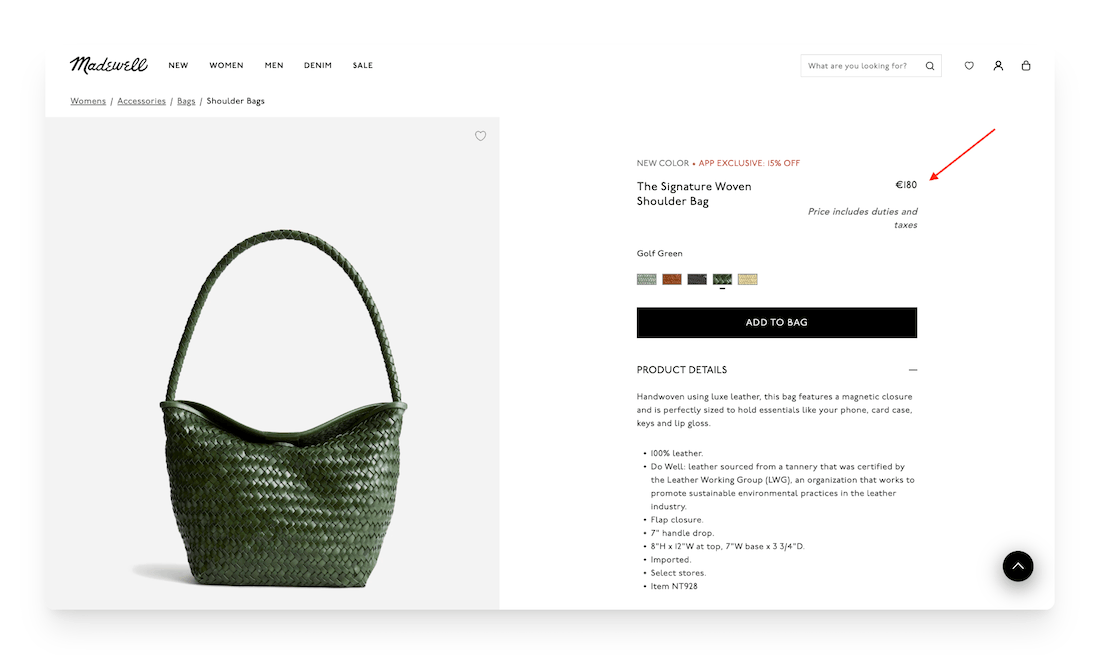
Clear pricing on the Madewell site, with a note that duties and taxes are included in the price
You can also highlight value by clearly showing discounts, savings, or comparisons (e.g., original vs. sale price) so customers immediately see the benefit of purchasing now.
In addition, aim to keep pricing visually simple and easy to scan, using consistent formatting and placing it prominently near the call-to-action (CTA) button.
5. Add social proof
Social proof is powerful for ecommerce CRO because it reduces uncertainty and builds trust at the exact moment customers are deciding whether to add a product to their cart.
When shoppers see that others have purchased and loved the product, it validates their decision and lowers perceived risk.
People naturally look to others for guidance, especially when buying online, where they can’t physically inspect the item.
To use social proof effectively, showcase reviews and ratings prominently near the product title and CTA.
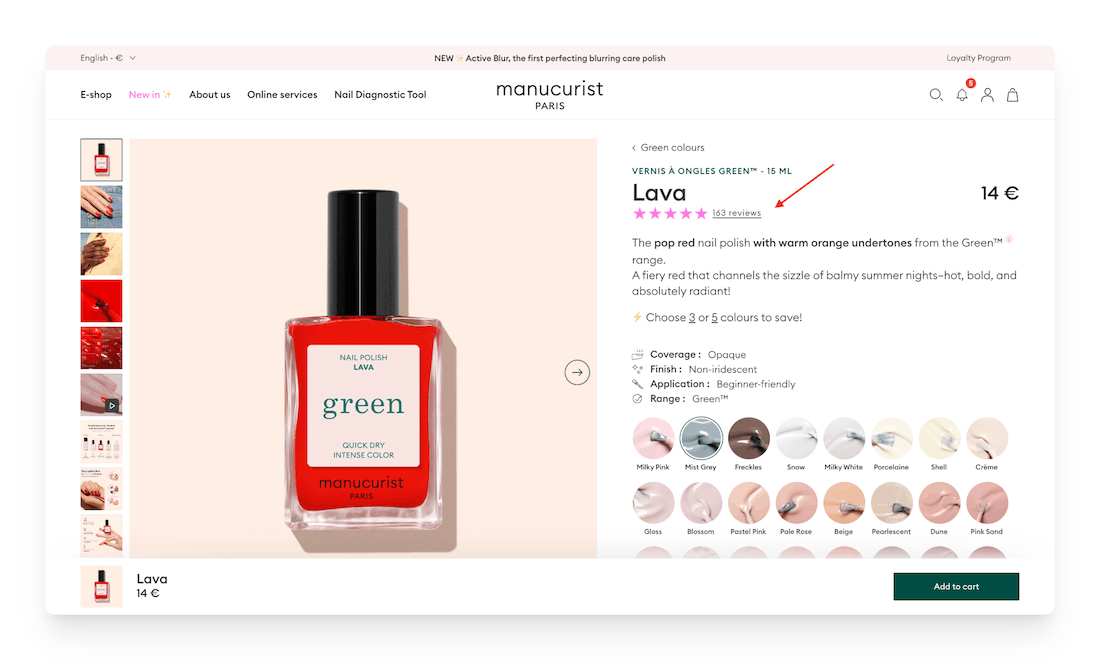
Reviews for the Manucurist nail polish in “Lava”
It’s also advantageous to highlight specific testimonials that speak to key benefits or address common concerns.
Including user-generated content, such as customer photos or videos, can help make the experience feel authentic and relatable.
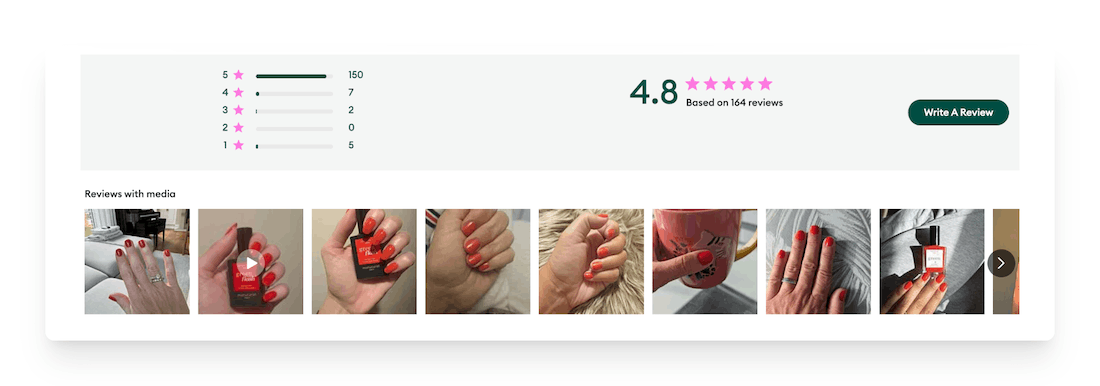
Product reviews with photos and videos on the Manucurist site
In addition, featuring phrases like “Best Seller” or “1,000+ happy customers” can further reinforce popularity.
Lastly, try to keep reviews current and detailed, and respond publicly to feedback when possible.

Manucurist responding to a customer review
6. Strengthen trust signals
Another one of the best ways to increase your add-to-cart conversion rate is to increase confidence in your digital commerce business through the trust signals you share on your site.
Online shoppers often hesitate to add an item to their basket if they don’t feel confident about payment security, product quality, or return hassles. Clear trust signals help remove these doubts at the moment of decision, reducing perceived risk and reassuring ecommerce customers that it’s safe to buy from you.
For instance, you might display secure checkout badges (e.g., SSL or payment provider logos) near the add-to-cart button to reinforce safety.
Also be sure to provide transparent return policies and warranties so customers know they’re protected if something goes wrong.
Clearly outlining shipping costs, delivery times, and tracking options can help prevent uncertainty or surprise fees.
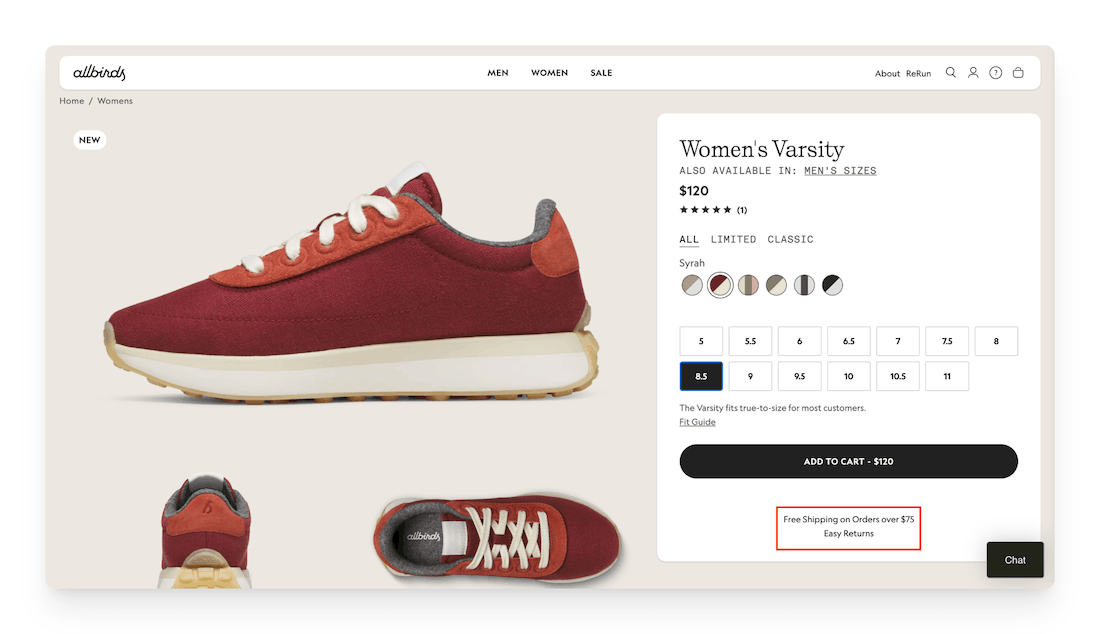
Free shipping policy listed directly on an Allbirds product page
Additionally, you can reinforce credibility with guarantees like “money-back” promises or satisfaction assurances.
7. Optimize for mobile
It’s no secret that mobile commerce has seen a major increase in recent years, with a large share of online shopping now happening on smartphones, making mobile-first design essential in ecommerce.
Based on data from a 2023 survey by Statista, smartphones were the most popular device among U.S. consumers for purchasing products and services online. In fact, they outperformed laptops, with 73% of respondents reporting that they used a smartphone to place their ecommerce orders.
If your mobile experience is slow, cluttered, or difficult to use, customers are far more likely to abandon the process before adding anything to their cart.
Make shopping as enjoyable as possible for those consumers visiting your online store via a mobile device by compressing images and minimizing unnecessary scripts to prioritize fast load speeds, remembering that every second of delay reduces conversions!
You can additionally opt to use sticky add-to-cart buttons so the purchase option is always visible without excessive scrolling and simplify the layout with clean navigation, large tap targets, and minimal form fields to reduce friction.
Because mobile shoppers will be viewing your ecommerce website from a smaller screen, you’ll need to ensure that text is easy to read, and key information (price, reviews, shipping) is immediately visible.
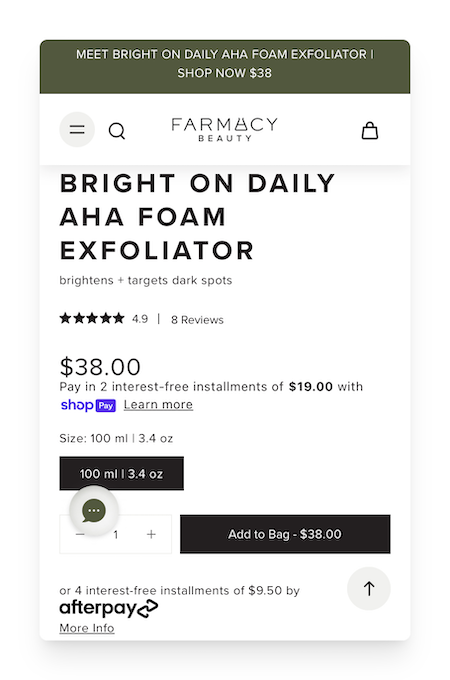
Product page on mobile version of the Farmacy Beauty website
It’s also helpful to streamline the checkout process with mobile-friendly payment options and autofill where possible.
8. Use urgency and scarcity
Playing on urgency and scarcity is effective when it comes to boosting your digital commerce CRO because it reduces procrastination.
A lot of shoppers add items to their cart with good intentions but don’t buy right away because of distractions or comparison shopping.
When customers perceive that a product may sell out or that a deal will expire soon, it increases the perceived value of acting now versus later. This shortens the decision-making window and boosts add-to-cart and checkout rates.
To apply this effectively (and ethically) use truthful, data-backed signals. For example, display real-time low-stock messages (“Only 3 left in stock”), limited-time discounts with clear expiration countdowns, or shipping deadlines (“Order in the next 2 hours for next-day delivery”).
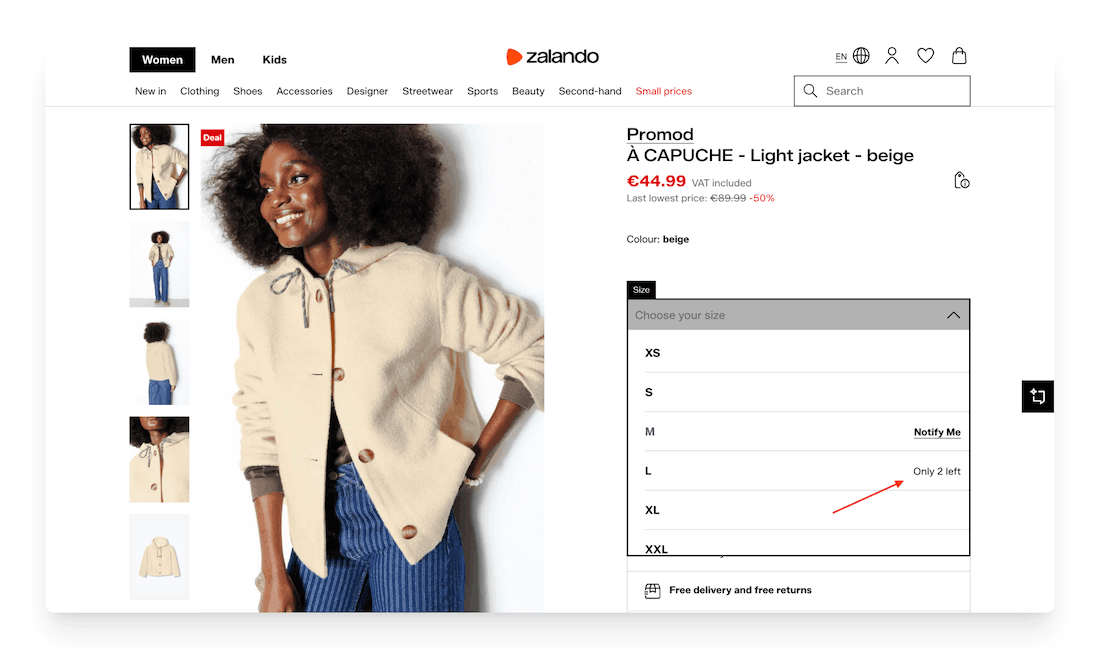
Zalando displaying the number of articles that remain stock
Highlight genuine seasonal or promotional campaigns (e.g., “Free shipping on all orders—today only!) rather than fake timers that reset. You can also show demand indicators such as “12 people are viewing this item.”
The key is authenticity. False scarcity damages trust, while transparent urgency motivates action and strengthens long-term customer relationships.
9. Add a chatbot
Sometimes digital commerce shoppers will take a while to add items to their baskets due to unanswered questions about product details, sizing, pricing, shipping, or returns.
Adding a chatbot to your ecommerce site can significantly increase add-to-cart conversion rates by removing friction in the buying journey.
An ecommerce chatbot provides instant, 24/7 support, helping users make quicker, more confident decisions instead of abandoning the page.
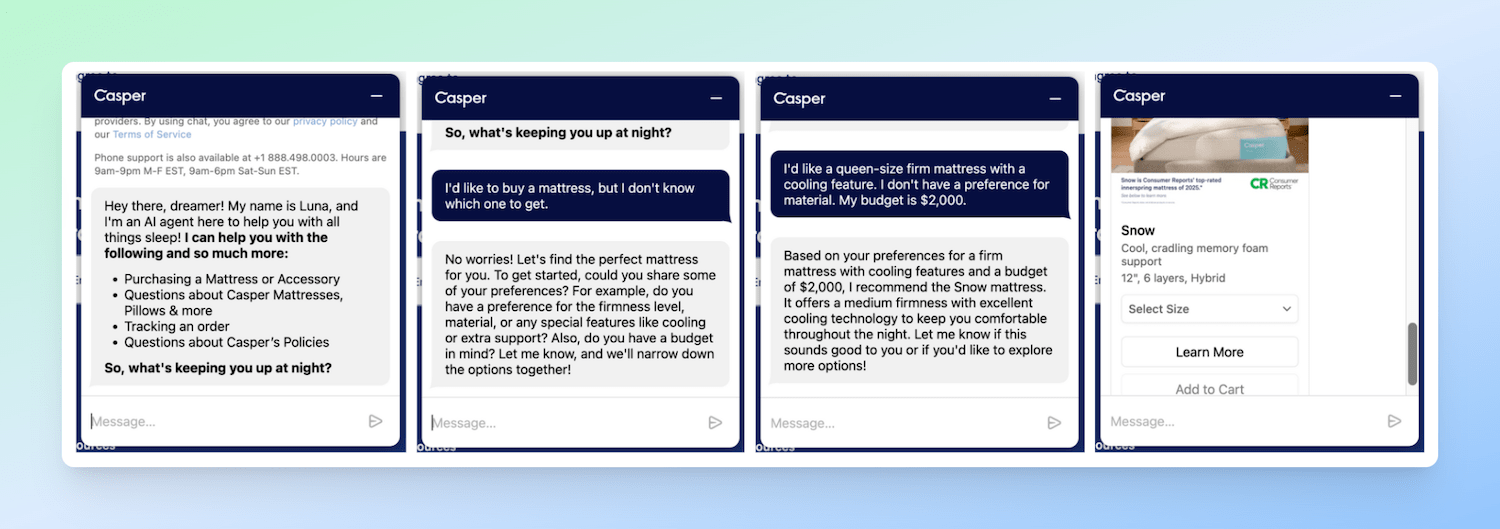
AI chatbot on the Casper website
For the best chance of success with this strategy, you’ll want to be sure to position the chatbot where it’s easy to find but not intrusive (e.g., bottom corner).
Program it to handle common pre-purchase questions, recommend products based on user needs, and guide users toward adding items to their cart. For example, it can proactively trigger messages like “Need help choosing?” or “I can recommend the best option for you.”
In addition, you might choose to include AI or scripted flows to personalize responses based on browsing behavior, and include easy handoff to a human agent for complex queries.
10. Take advantage of behavioral analytics
Behavioral analytics is crucial for boosting add-to-cart conversion rates because it reveals how users actually interact with your site, e.g., where they click, scroll, hesitate, or drop off.
Instead of guessing why conversions are low, you gain data-driven insight into friction points and missed opportunities.
To use it effectively, consider tracking key events such as the following:
- product views,
- bounce rate,
- time on page,
- add-to-cart clicks, and
- cart abandonment.
Tools like heatmaps and session recordings show where users get stuck (e.g., confusing layouts or hidden CTAs).
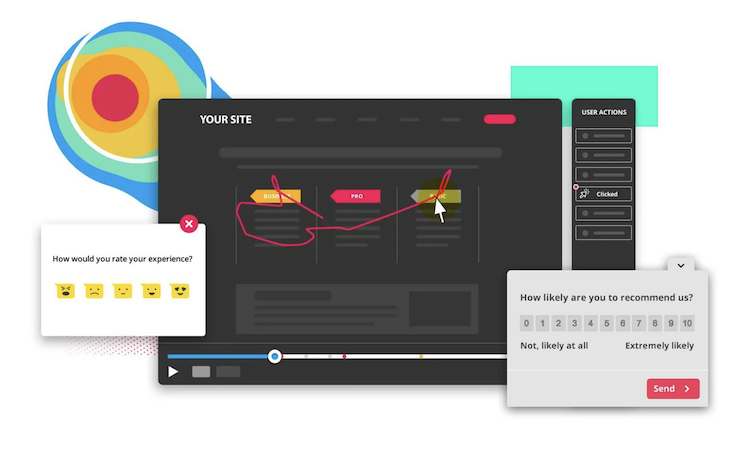
Hotjar behavior analytics tools
With the help of free and/or paid behavioral analytics tools, you can analyze funnels to identify where users exit before adding items to their cart.
Don’t forget to segment users (new vs. returning, mobile vs. desktop) to uncover different behaviors.
Once insights are clear, test improvements, like simplifying page structure, making buttons more prominent, or clarifying pricing and shipping info, combining this with A/B testing to validate changes.
By continuously monitoring and optimizing based on real behavior, you create a smoother experience that naturally drives more users to add products to their cart.
11. Perform A/B testing on a regular basis
A/B testing is essential for improving add-to-cart conversion rates because small design or messaging changes can significantly influence user behavior, but their impact isn’t always predictable.
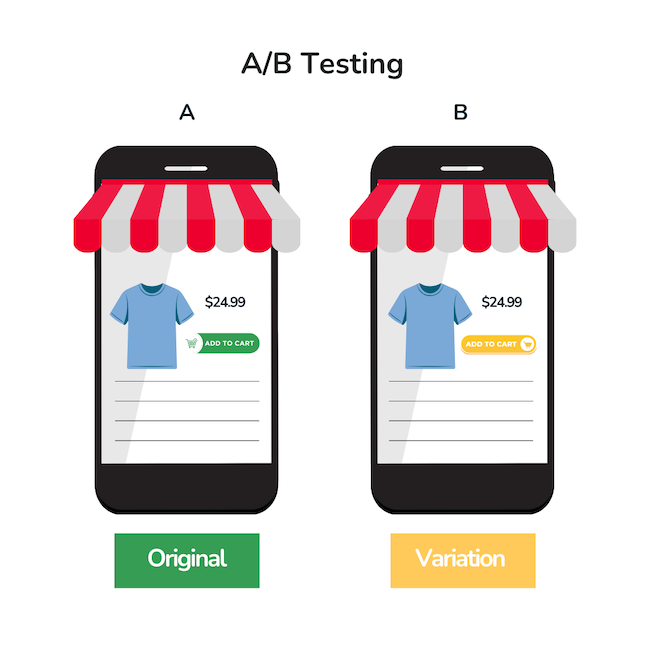
Rather than relying on assumptions, A/B testing lets you compare two versions of a page (A vs. B) and measure which one leads to more add-to-cart actions using real user data.
To implement it, test one variable at a time for clear insights. For example, experiment with button color (e.g., contrasting vs. neutral), copy (“Add to Cart” vs. “Buy Now”), and placement (above vs. below the fold).
You can also test pricing displays (e.g., showing discounts or payment plans) and page structure (simplified vs. detailed layouts).
Use a statistically significant sample size and run tests long enough to avoid misleading results.
Aim to continuously iterate based on what you find. Over time, these incremental improvements compound, leading to a more optimized shopping experience and higher conversion rates.
Conclusion
Improving your add-to-cart rate is one of the most practical ecommerce growth strategies you can implement.
Small, consistent improvements, through testing, refined content, and better user experience, can significantly increase the number of shoppers who move products into their carts and closer to checkout.
Focus on optimizing key touchpoints across your store, from product pages to pricing displays and basket visibility.
In addition, you’ll want to analyze user sessions to identify friction points, and don’t rely on assumptions… Let data guide your decisions!
Be sure to include clear calls to action, compelling product information, and trust signals that build confidence.
You’ll find that when you continuously test and refine your approach, you create a smoother path from interest to intent.
Over time, these incremental gains compound, which will help you convert more sessions into filled carts and sustainable revenue growth for your online store.



Brian Wood le 9 March 2026 à 22:07
Faculty of Economics and Management le 26 April 2026 à 10:17