


Key points in this article:
- Guest checkout lets customers finalize a purchase without creating or logging into an account, reducing friction in the buying process.
- Allowing guest checkout helps lower cart abandonment by removing the barrier of forced registration.
- While guest checkout improves convenience and mobile conversions, it limits data collection and repeat purchase incentives.
- Companies like Chewy, Boots, and LEGO provide clear guest checkout options alongside login prompts.
- Key practices include making the guest option visible, minimizing required fields, offering account creation after purchase, and supporting multiple payment methods.
These days, it seems like everything requires creating an account, including shopping online.
For many ecommerce shoppers who don’t wish to add another new account to their list, having the option to check out as a guest when completing an order can be not just a relief but a major incentive to buy.
According to a Capterra survey, 43% of consumers have a preference for using the guest checkout option when purchasing on the internet.
Guest checkout has become a crucial feature for ecommerce sites, allowing customers to complete purchases without creating an account. This streamlined option reduces barriers, speeds up the buying process, and helps prevent cart abandonment.
Implementing guest checkout effectively requires thoughtful design and optimal methods to balance ease of use with security and customer convenience.
In this blog post, we will go over what guest checkout is, the benefits and limitations of this digital commerce feature, examples of real-life guest checkouts, and best practices to follow to optimize guest checkout and offer an enhanced user experience on your site, ultimately boosting your sales and customer satisfaction!
What is guest checkout?
Guest checkout is an ecommerce feature that allows customers to finalize a purchase without creating an account or logging in.
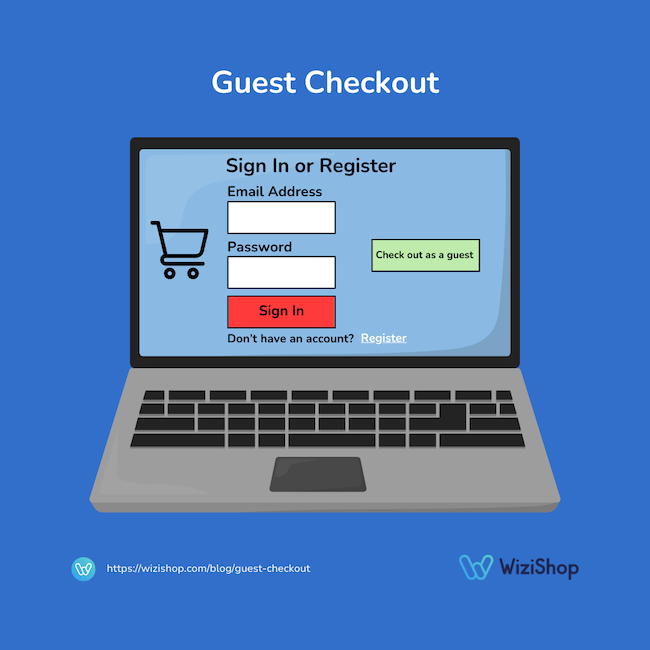
Instead of registering, shoppers simply offer the essential information needed to process the order, such as shipping details, billing information, and payment method. This reduces friction in the buying process, saves time, and can lower cart abandonment rates, especially for first-time or occasional customers.
While guest checkout offers convenience, many retailers still encourage account creation after purchase so customers can track orders, save preferences, and enjoy a more personalized shopping experience with the store.
Benefits of guest checkout
Reduced cart abandonment
Giving your customers the option to check out as guests removes one of the most common friction points in ecommerce: forced account creation.
Many shoppers abandon their carts when asked to register, especially if they’re in a hurry or just there to make a one-time purchase.
By allowing customers to check out quickly without creating a password or filling extra fields, businesses make the buying process smoother, faster, and less frustrating, which directly helps increase completed purchases.
Faster and more convenient shopping experience
Guest checkouts streamline the purchase process by limiting required steps to only essential information.
Customers don’t need to create usernames, remember passwords, or verify email accounts before completing a purchase. This convenience is especially valuable for mobile shoppers, where long forms can be cumbersome.
A faster checkout improves overall user experience and aligns with modern consumer expectations for speed and simplicity—essential in ecommerce.
Better experience for first-time customers
First-time shoppers may hesitate to create an account with a brand they are not yet familiar with or fully trust.
Guest checkouts lower this psychological barrier, allowing customers to try the brand with minimal commitment.
Once a user has a more positive purchasing experience, they’re more likely to return and potentially create an account later, making guest checkout a strong tool for customer acquisition.
Increased mobile conversion rates
On mobile devices, complex checkout flows can be particularly challenging due to small screens and touch-based input.
Guest checkout
reduces the number of steps and form fields, making it easier for mobile users to finalize purchases.
This improved usability can significantly boost mobile conversion rates, which is critical as a growing percentage of ecommerce traffic and sales comes from smartphones and tablets.
→ Read also: Advantages of mobile commerce
Greater customer choice and flexibility
Guest checkouts respect customer preferences by giving shoppers control over how they interact with a brand.
Some customers prefer not to create accounts due to privacy concerns or inbox fatigue. Sites that offer guest checkout demonstrate customer-centric design and flexibility.
At the same time, businesses can still invite customers to create an account after purchase, balancing convenience with long-term relationship-building opportunities.
Limitations of guest checkout
Limited collection of customer data
Guest checkout provides fewer opportunities to collect detailed customer data compared to registered accounts.
Without profiles, businesses may miss insights into purchase history, browsing behavior, and preferences, limiting personalization, targeted marketing, and advanced analytics.
While order-level data is still available, the lack of a persistent customer identity can make it harder to build long-term relationships and tailor experiences that drive repeat purchases.
Reduced repeat purchase incentives
Customers who check out without creating an account are less likely to return automatically, since they don’t have saved information, order history, or loyalty benefits tied to an account.
This can reduce repeat purchase rates and customer lifetime value.
Although follow-up emails can encourage account creation after purchase, guest shoppers may still be less engaged than registered users who receive personalized offers and easier repeat checkout experiences.
More challenging order management for customers
Without an account, customers may find it harder to track orders, manage returns, or access past purchases.
They typically rely on confirmation emails for order details, which can be lost or filtered into spam folders. This can lead to increased customer support inquiries and frustration.
Account-based checkout provides a centralized place for customers to manage their interactions with the brand more easily.
Examples of guest checkout
Chewy
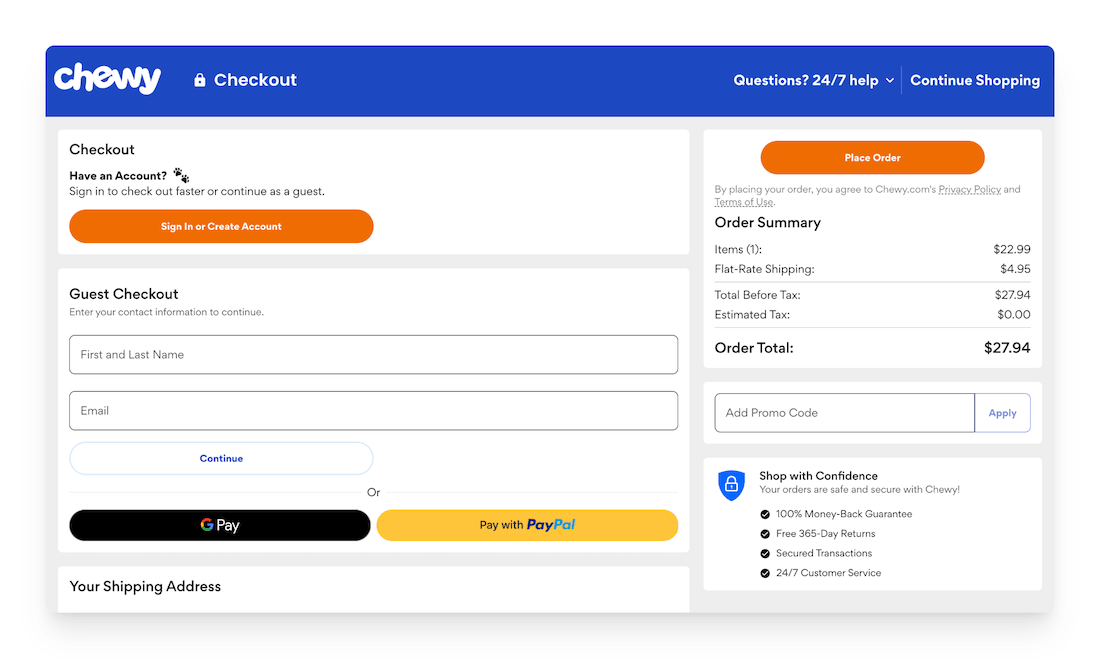
Pet supply company Chewy makes it possible to check out as a guest when the customer arrives on the checkout page.
At the top of the page, buyers have the option to sign in or create an account to check out faster.
The “Guest Checkout” section is clear and easy to spot, located just below. The customer will simply enter their first and last name, along with their email address, and click “Continue.”
Boots
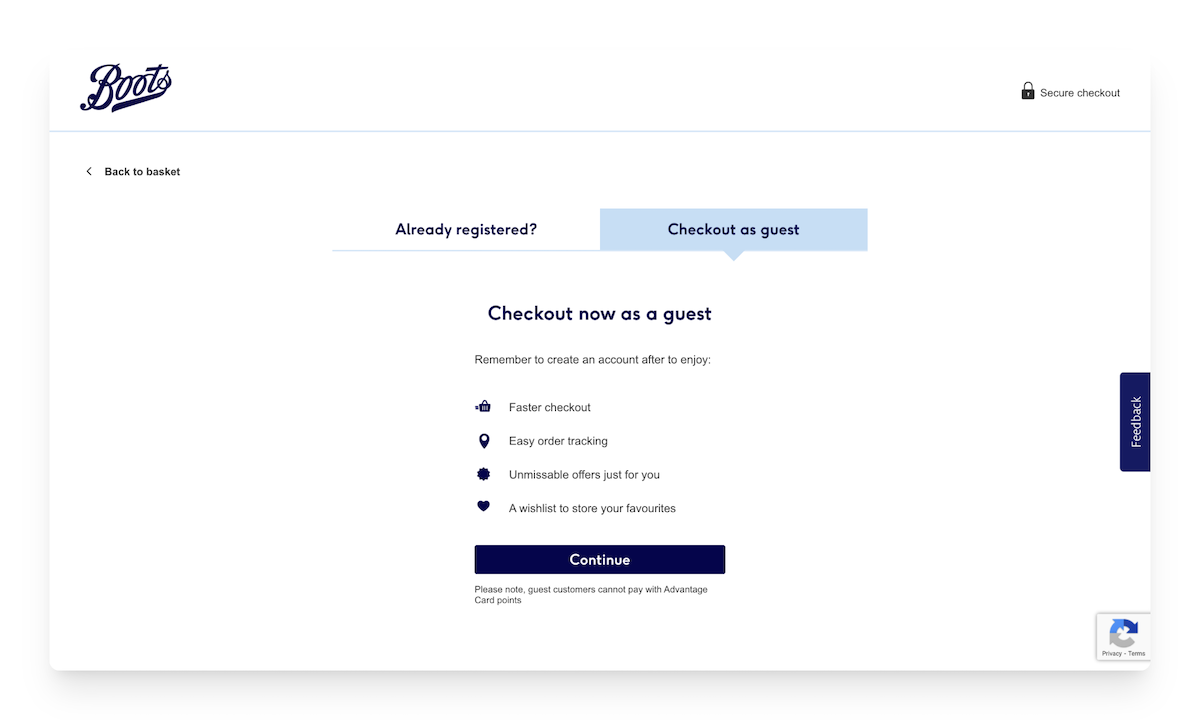
Another good example of guest checkout comes from pharmacy Boots, where people are able to sign in if they already have an account or check out as a guest.
If buyers opt for guest checkout, Boots encourages them to create an account afterwards, describing the benefits of doing so: faster checkout, easy order tracking, unmissable offers, and a wishlist to store their favorite items.
The company also reminds customers that using the guest checkout option prohibits them from being able to pay for their orders with Advantage Card points.
LEGO
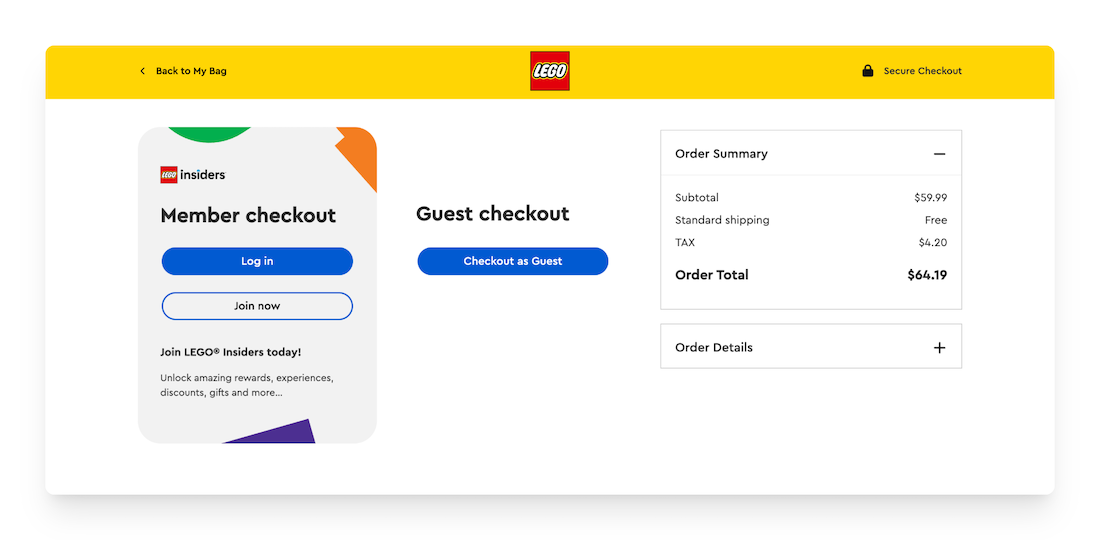
When buyers go to check out on the LEGO website, they can choose between checking out as a LEGO Insiders member or as a guest.
The member checkout option is highlighted, encouraging customers to either log in or join LEGO Insiders as a new member.
In addition, LEGO mentions the benefits of the Insiders program, such as being able to enjoy rewards, experiences, discounts, gifts, and more.
Best practices for implementing guest checkout
1. Make the guest checkout option highly visible
First things first: when potential customers are ready to finalize their orders on your digital commerce website, they should be able to find where they can check out as guests rather than having to spend precious time trying to locate this option.
Clearly present “Check out as Guest” as an equal option to account login, not hidden or secondary, so shoppers don’t feel forced to register.
If people feel like they’re being tricked into creating an account, they may abandon your store entirely and head to a competitor’s instead to buy products—not just for their current order but for future purchases too.
2. Minimize required fields
To successfully implement guest checkout on your ecommerce site, don’t forget to ask only for essential data needed to process the order, such as email address, shipping details, and payment information, reducing form length and checkout time.
When you reduce the number of mandatory fields, you will be able to lower friction, speed up the ecommerce checkout process, and decrease cart abandonment.
It also improves usability on mobile devices and creates a smoother experience for first-time or time-constrained customers, increasing the likelihood they will successfully complete their order.
3. Optimize for mobile users
According to Wiser Review, over 70% of online shoppers have completed purchases via mobile devices.
It’s therefore important that retailers in web commerce keep mobile users in mind when implementing guest checkout on their online stores.
Designing your guest checkout with mobile-first layouts, large input fields, and autofill support to ensure ease of use on smaller screens can help make the process of checking out as a guest more enjoyable for buyers using their smartphones or other mobile devices.
4. Offer account creation after purchase
Just because shoppers choose the option to check out as a guest doesn’t mean they can’t be convinced to register on your site afterwards!
Invite customers to create an account once the order is complete, using pre-filled information to make it easy to sign up.
Also be sure to highlight the benefits of account creation, like access to order history, opportunity to earn rewards, wishlist creation, free gifts, etc., to further encourage customers to sign up.
5. Provide clear security and privacy messaging
Even if customers choose to not register or sign in on your website, they should feel confident that their personal and payment information is protected when making a purchase.
Reassure shoppers by displaying trust signals, secure payment badges, and concise privacy explanations during the checkout process.
Clear messaging builds confidence, reduces anxiety about sharing information without creating an account, and helps customers feel safe completing their purchase, which can increase conversion rates and trust in your brand.
6. Enable order tracking for guests
It’s also important for customers who check out without creating an account to be free to easily view their order status after purchase.
This is typically best done through confirmation emails with tracking links or a lookup page using an order number and email address.
Providing guest order tracking improves transparency, reduces support inquiries, and reassures customers that they can monitor delivery progress without needing to register for an account.
7. Support multiple payment options
Digital commerce consumers are used to having choices, and this includes how they’re able to pay for their orders.
As part of your site’s payment management, a key function of electronic commerce, you should be able to offer popular and fast payment options (credit cards, digital wallets, buy now pay later, PayPal) to help accommodate different preferences and build trust, reducing checkout friction further the guest checkout process.
Many shoppers feel more comfortable using PayPal, for example, because it reduces the need to share card details directly.
In fact, Business.com reports that 32% of millennials use PayPal, and a quarter of those users prefer this payment option over others.
Including PayPal alongside other methods can accelerate checkout, lower abandonment, and increase overall conversion rates.
8. Test and monitor checkout performance
Finally, after implementing guest checkout on your ecommerce site, you will want to keep an eye on how well this aspect of your online store is performing to ensure that your guest checkout works smoothly for all users.
Regular testing helps identify bugs, slow load times, or confusing steps that could prevent customers from completing purchases.
Monitoring metrics like conversion rate, abandonment rate, and error frequency reveals where improvements are needed.
Conclusion
Just like with shipping and payment methods, people like having options when it comes to account creation on ecommerce websites.
Don’t underestimate the importance of providing your current and future customers with guest checkout, a powerful tool that can help reduce friction and boost conversions by offering users a fast, free, and convenient way to complete purchases.
By studying examples of successful implementations and continuously testing your checkout flow, you can stay ahead as digital commerce continues to evolve.